Is your database department ready for India's DPDP Act? If you haven't started Database Activity Monitoring (DAM), now is the time to act.
India's Digital Personal Data Protection (DPDP) Act, 2023, and the DPDP Rules, 2025, have brought data privacy and security into sharper focus for enterprises. Organisations handling digital personal data need to strengthen their security controls, understand how data is accessed, and be prepared to investigate and respond to personal data breaches.
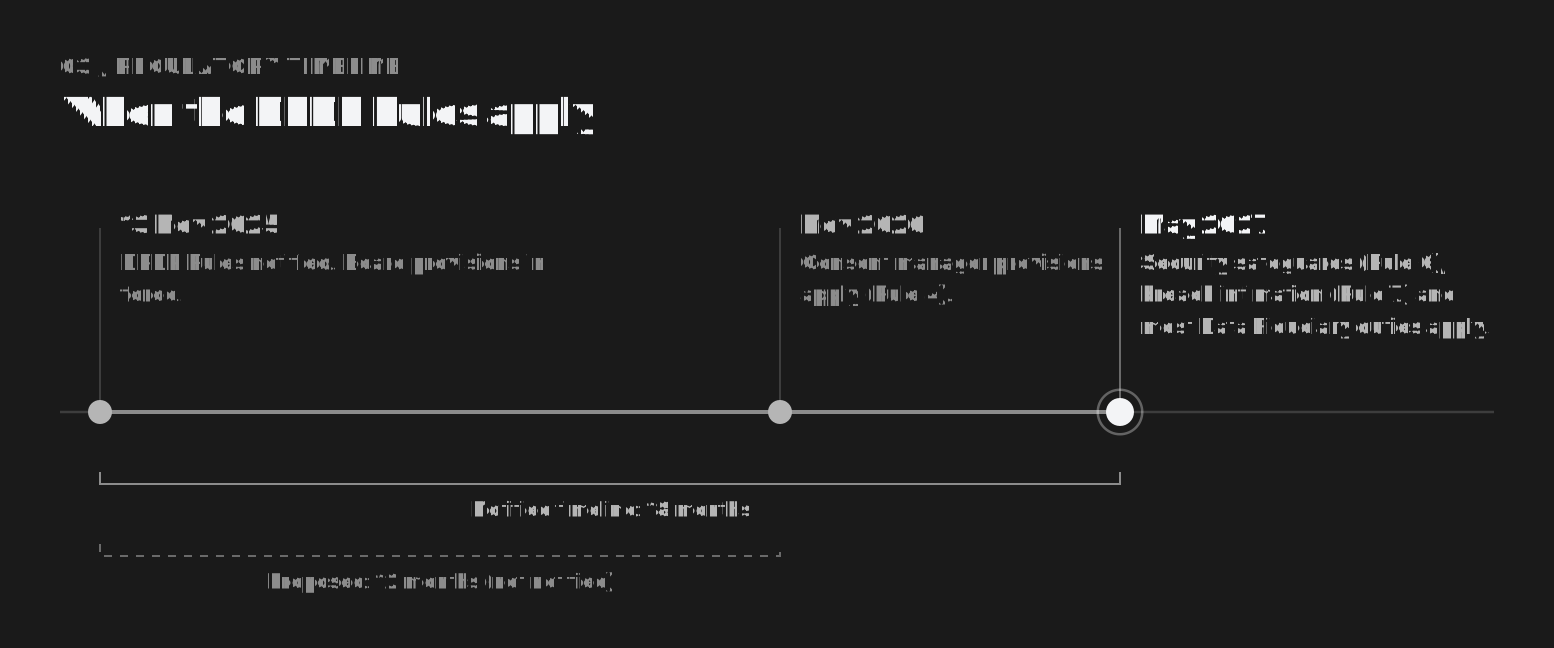
The Rules were notified on 13 November 2025. The obligations that matter most to database teams, including reasonable security safeguards and breach intimation, are scheduled to apply from May 2027. That is a short runway for work that touches every production database.
For Heads of Database, DBAs, Data Architects, CIOs, and CISOs, this means going beyond database uptime, performance, and availability.
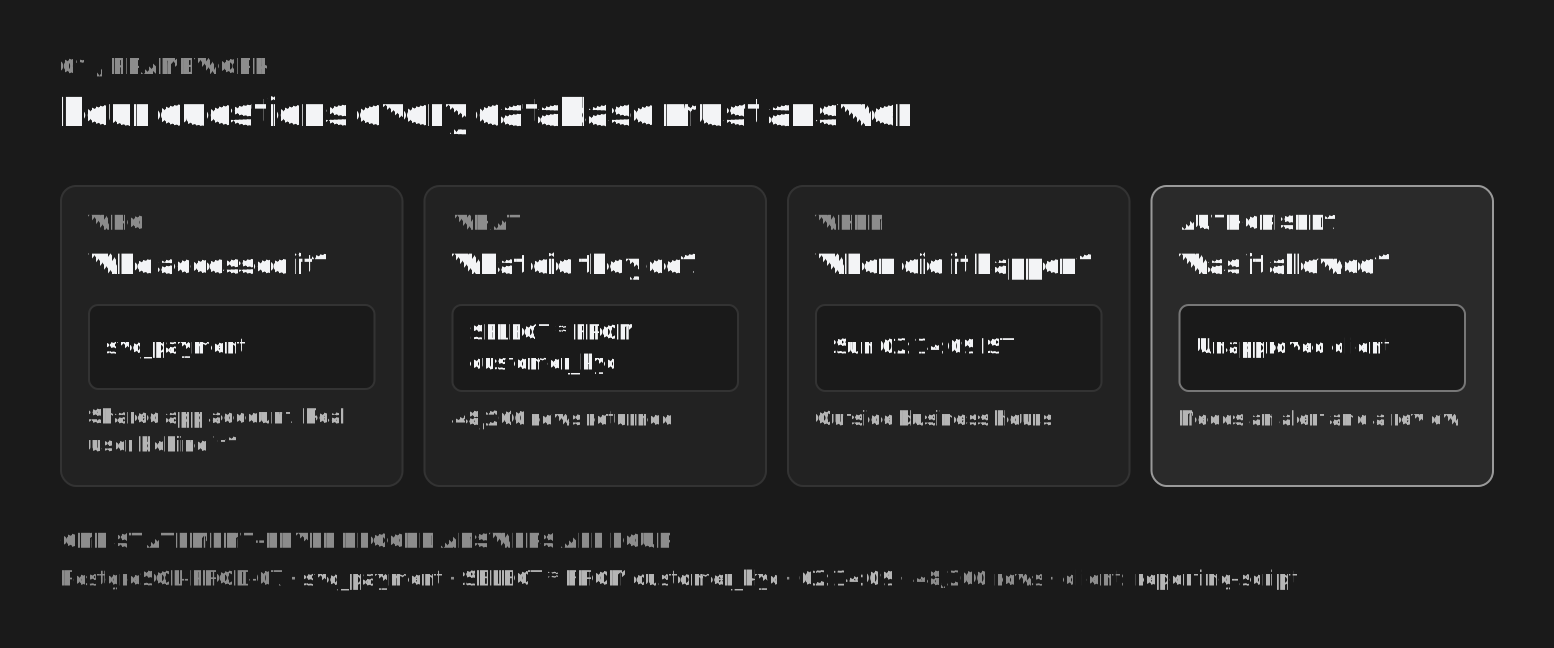
You must also know who accessed your databases, what they did, when they did it, and whether the activity was authorised.
View full-size illustration ↗
Here are the top 10 things every enterprise database leader should know.
1. Know Where Your Personal Data Resides
Personal data may be distributed across Oracle, PostgreSQL, MySQL, Microsoft SQL Server, MongoDB, Redis, and other database platforms.
You need visibility into which databases store personal data, which applications access it, and which environments contain production copies.
Action: Maintain an inventory of databases and identify systems that store or process personal data.
2. Know Who Is Accessing Your Databases
Having database access controls is important, but knowing who actually accesses sensitive data is equally critical.
Database activity can originate from application accounts, DBAs, developers, service accounts, administrators, or third-party users.
Shared and pooled application accounts make this harder. The database sees one login, while many real users can sit behind it.
Action: Monitor database logins, user identities, access attempts, and privileged sessions wherever the database platform supports it.
3. Monitor What Users Do Inside the Database
A successful login does not automatically mean the activity is legitimate.
A user may access customer records, execute unexpected queries, modify sensitive information, or attempt to extract large volumes of data.
Action: Monitor relevant database operations, including queries, reads, writes, updates, deletes, schema changes, and administrative actions.
4. Detect Unauthorised Access and Suspicious Behaviour
Compromised credentials and insider threats can put personal data at risk. Examples include:
- Repeated failed logins
- Unusual access patterns
- Unexpected privileged activity
- Queries that access sensitive records outside normal business operations
Action: Establish activity baselines, identify anomalies, and configure alerts for suspicious database behaviour.
5. Maintain Database Activity Logs and Monitoring
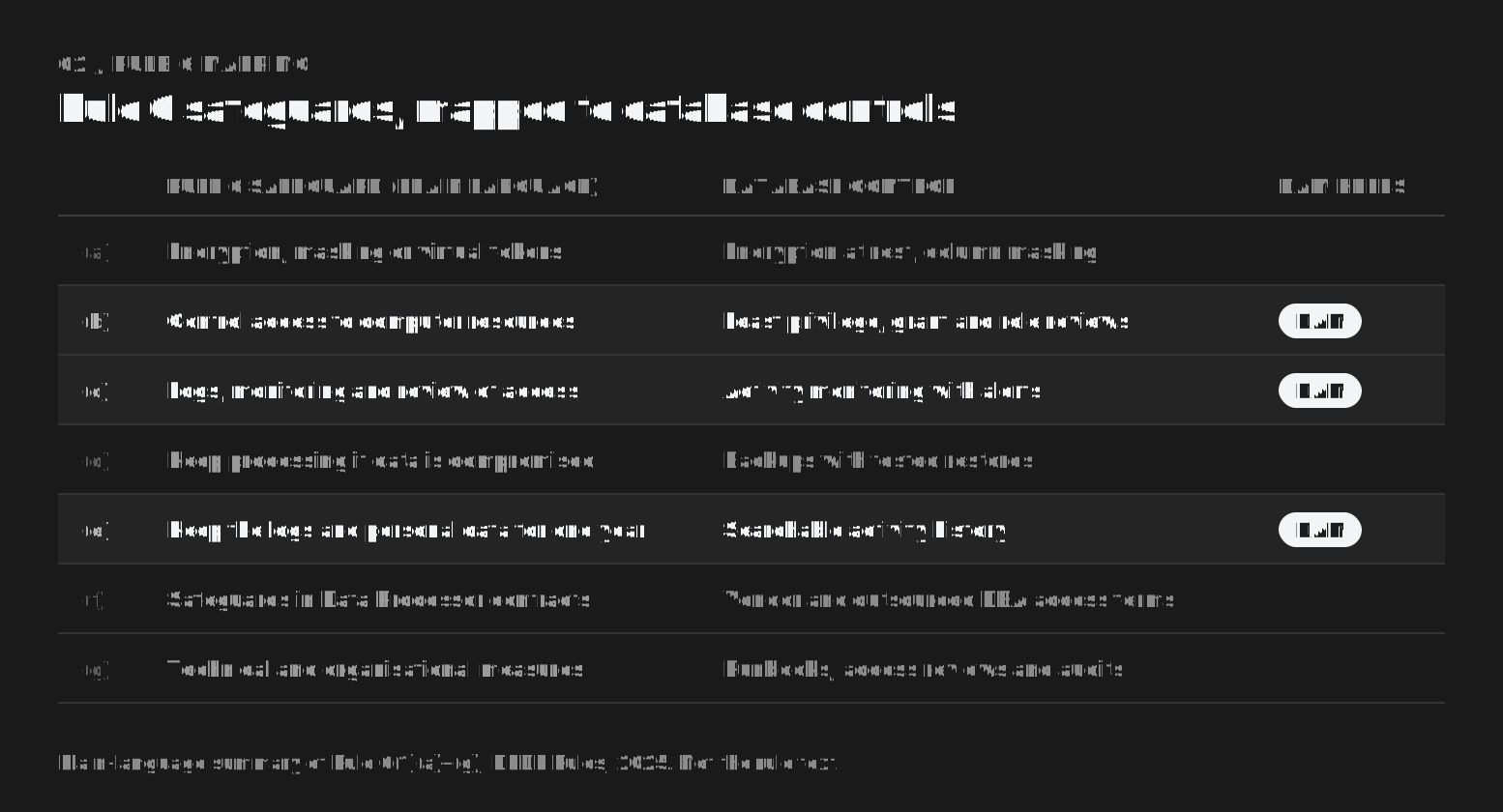
Rule 6 of the DPDP Rules, 2025, sets out the minimum reasonable security safeguards a Data Fiduciary must take to protect personal data. Three of them land squarely on database teams:
- Access control: appropriate measures to control access to the computer resources that process personal data.
- Visibility: logs, monitoring, and review of access to personal data, so that unauthorised access can be detected, investigated, and remediated.
- Retention: a minimum one-year retention period for the relevant logs and personal data, for the purposes described in the rule, subject to applicable legal requirements.
View full-size illustration ↗
Rule 6 is part of the group of provisions that commence 18 months after notification, in May 2027. MeitY has proposed shortening that window to 12 months. At the time of writing the change has not been notified, so confirm the date against the Official Gazette.
View full-size illustration ↗
The stakes are significant. Under the Act's Schedule, failing to take reasonable security safeguards to prevent a personal data breach can attract a penalty of up to ₹250 crore.
Action: Review your logging coverage, retention policies, monitoring capabilities, and ability to retrieve historical database activity during an investigation.
6. Be Ready to Investigate a Personal Data Breach
When a suspected breach occurs, teams need to establish what happened, which systems and records were affected, which accounts were involved, and when the activity took place.
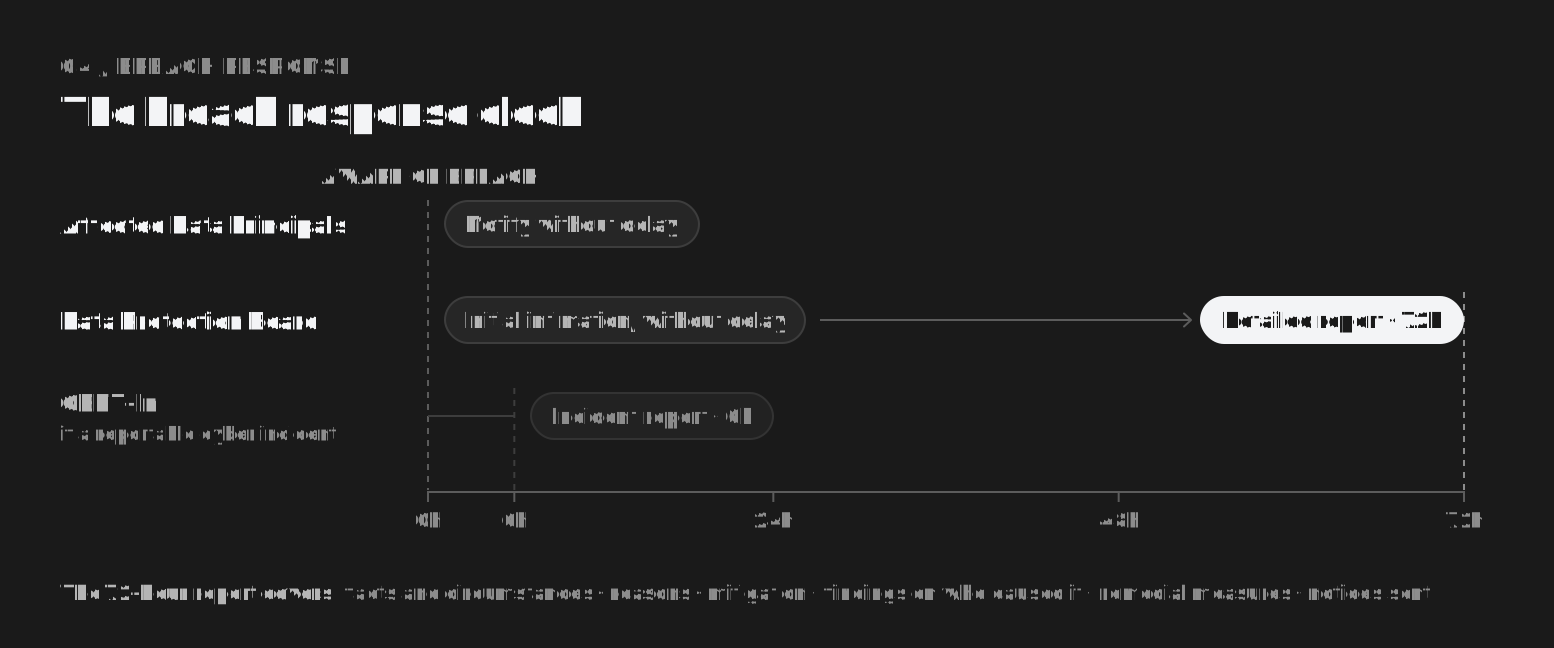
Rule 7 puts a clock on that work. Affected Data Principals must be informed without delay. The Data Protection Board must receive an initial intimation without delay, then a detailed report within 72 hours of the organisation becoming aware of the breach, unless the Board allows more time on a written request.
That detailed report covers the facts, circumstances, and reasons for the breach, the mitigation measures taken, and findings about the person who caused it. If the incident is also a reportable cyber incident, CERT-In's 2022 directions set a separate six-hour reporting window.
View full-size illustration ↗
Without adequate historical logs, investigations can become slow and incomplete.
The 72-hour report asks who caused the breach. Answering that is a database activity question.
Action: Ensure database activity records are searchable and can support incident investigation, evidence collection, and remediation.
7. Protect Privileged and Administrative Access
Database administrators require powerful privileges to maintain enterprise systems. However, privileged access also needs appropriate oversight.
Unexpected changes to permissions, security configurations, database objects, or audit settings can create significant risks.
Action: Monitor privileged operations, changes to user permissions, and critical administrative activity. Combine monitoring with least-privilege access and appropriate segregation of duties.
8. Extend Monitoring Across Your Database Ecosystem
Enterprises rarely operate a single database platform. They may run relational, NoSQL, caching, and cloud-managed databases across on-premises infrastructure and multiple cloud environments.
Monitoring gaps between platforms can make it harder to establish a complete picture of data access.
Action: Build a consistent database monitoring strategy across your environment, prioritising the systems that handle the most sensitive data.
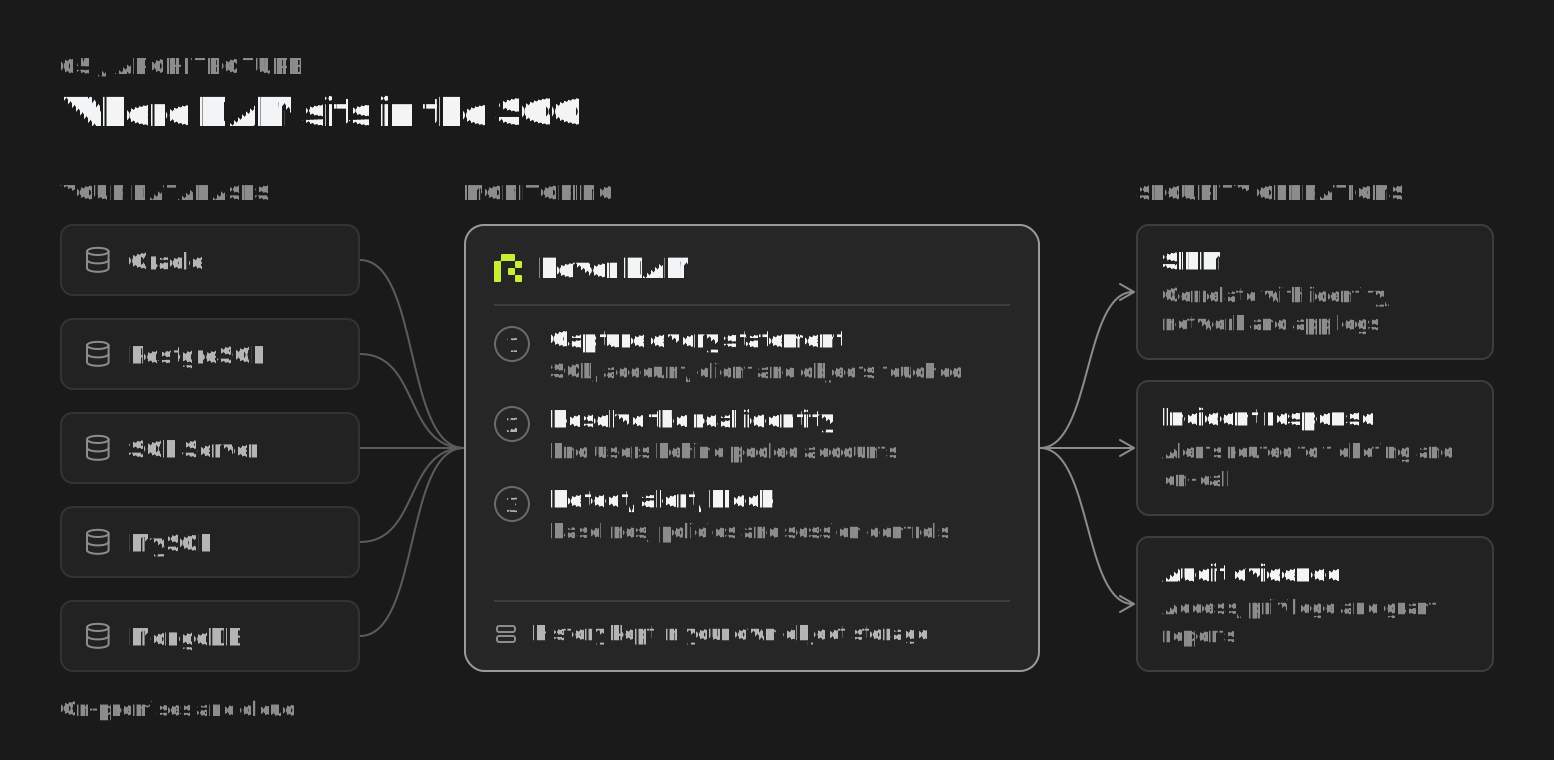
9. Integrate DAM with Your Security Operations
Database security should not operate in isolation from the enterprise Security Operations Centre (SOC).
A suspicious database event may need to be correlated with application logs, identity activity, network events, and other security signals.
View full-size illustration ↗
Action: Integrate database monitoring with your incident response processes and alerting workflows. Where appropriate, connect DAM with your SIEM and ticketing systems.
10. Make Database Activity Monitoring a Priority
Traditional database administration focuses on availability, performance, backups, replication, and capacity planning. These remain essential, but they do not automatically provide sufficient visibility into suspicious access to personal data.
Database Activity Monitoring (DAM) adds a security-focused layer of visibility into database activity.
A DAM solution can help teams monitor relevant activity, identify suspicious behaviour, investigate incidents, and maintain searchable records for security reviews.
Action: If you have not started DAM, make it part of your database security and DPDP readiness roadmap.
Have You Started DAM? It's Time to Explore Rover AI.
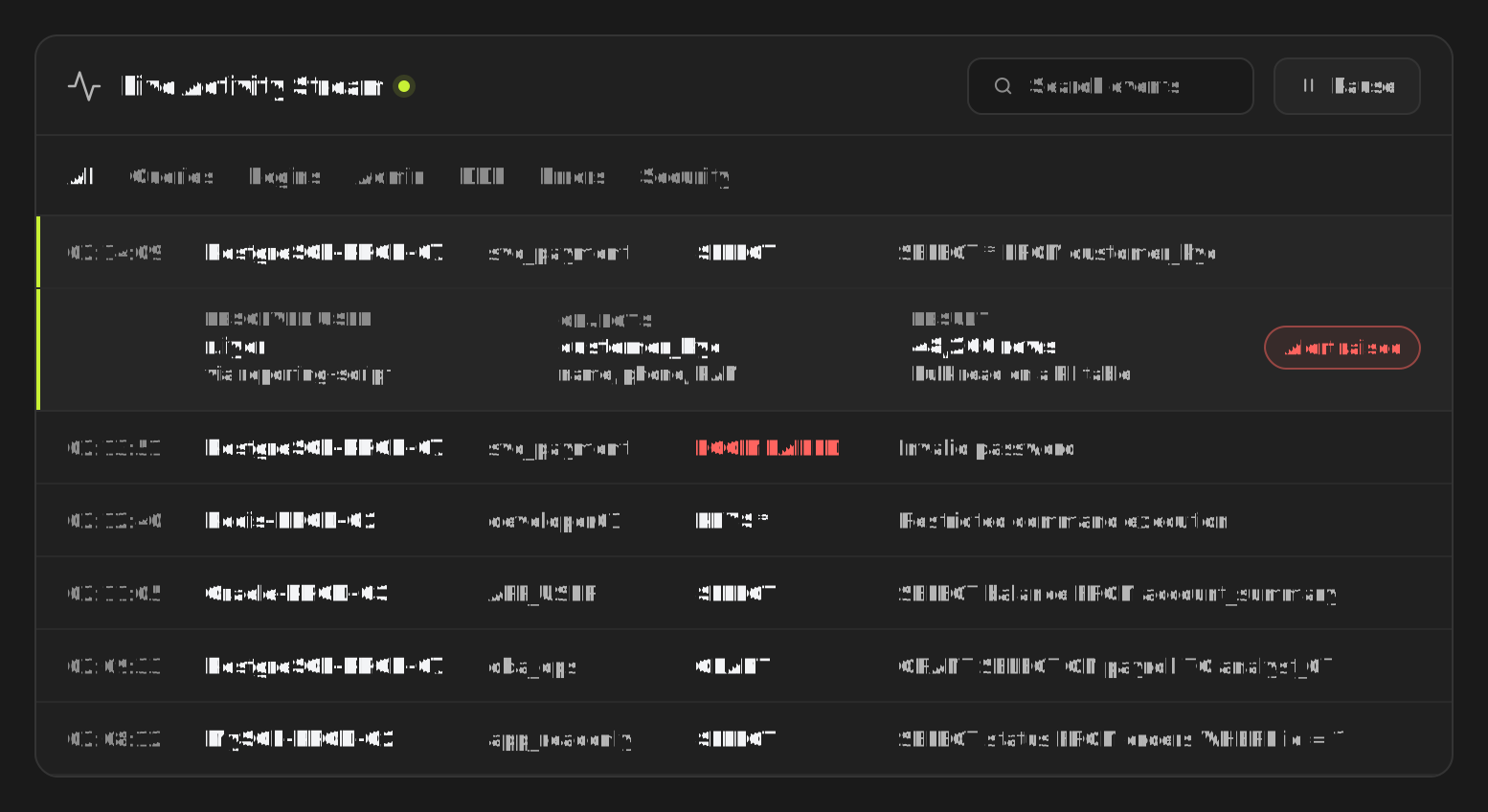
Meet Rover AI — Database Activity Monitoring (DAM) for enterprise database security.
Rover AI helps organisations strengthen visibility into database activity and investigate potentially suspicious behaviour across their database environments.
View full-size illustration ↗
With Rover AI DAM, your team can:
- See database activity: record every SELECT, INSERT, UPDATE, DELETE, and schema change as it runs, with the account, client application, and tables involved.
- Know who is really behind a query: trace statements on shared and pooled connections back to the real end user or service.
- Detect suspicious activity: learn each account's normal query patterns and flag mass reads of sensitive tables, unusual data volumes, privilege grants, and failed logins.
- Investigate and respond faster: search the full statement history to see which account ran which query, against which tables, and when. Alert, block a query, or terminate a session when policy is broken.
- Keep the evidence in your own storage: database activity stays searchable in your own object storage for as long as your retention policy requires, without restoring archives first.
- Cover your whole estate: discover database instances across on-premises and cloud, flag the ones nobody is monitoring, and classify the tables and columns that hold personal data.
Instead of relying solely on database logs that may be scattered across different systems, consider a dedicated approach to database activity monitoring.
Final Thoughts
The DPDP Act is a reminder that protecting personal data requires more than securing database infrastructure. Organisations also need appropriate visibility, safeguards, monitoring, and incident response capabilities.
As a database leader, ask yourself three questions:
- Can we identify who accessed sensitive data in our databases?
- Can we investigate suspicious activity and retrieve the relevant historical records?
- Can we demonstrate that our database monitoring and security controls are working as intended?
If the answer to any of these questions is no, it may be time to reassess your approach.
Start your DAM journey with Rover AI.
Improve database visibility. Strengthen security investigations. Prepare your enterprise for a more accountable approach to personal data protection.
Explore Rover AI DAM → or reach out to contactus@roverhq.ai
Disclaimer: This article is for general awareness and does not constitute legal advice or a guarantee of DPDP Act compliance. Applicability and commencement dates of specific provisions should be confirmed against the official Act, Rules, corrigenda, and enforcement timeline.